The problem with single-stage builds#
When you use the golang image to compile and run a Go application in the same stage, the final image inherits the entire Go compiler toolchain - over 800MB of packages and hundreds of CVEs that you don’t need at runtime.
Note: Single-stage Go builds keep the full compiler toolchain (~800MB+) in the final image even though only the compiled binary is needed at runtime.
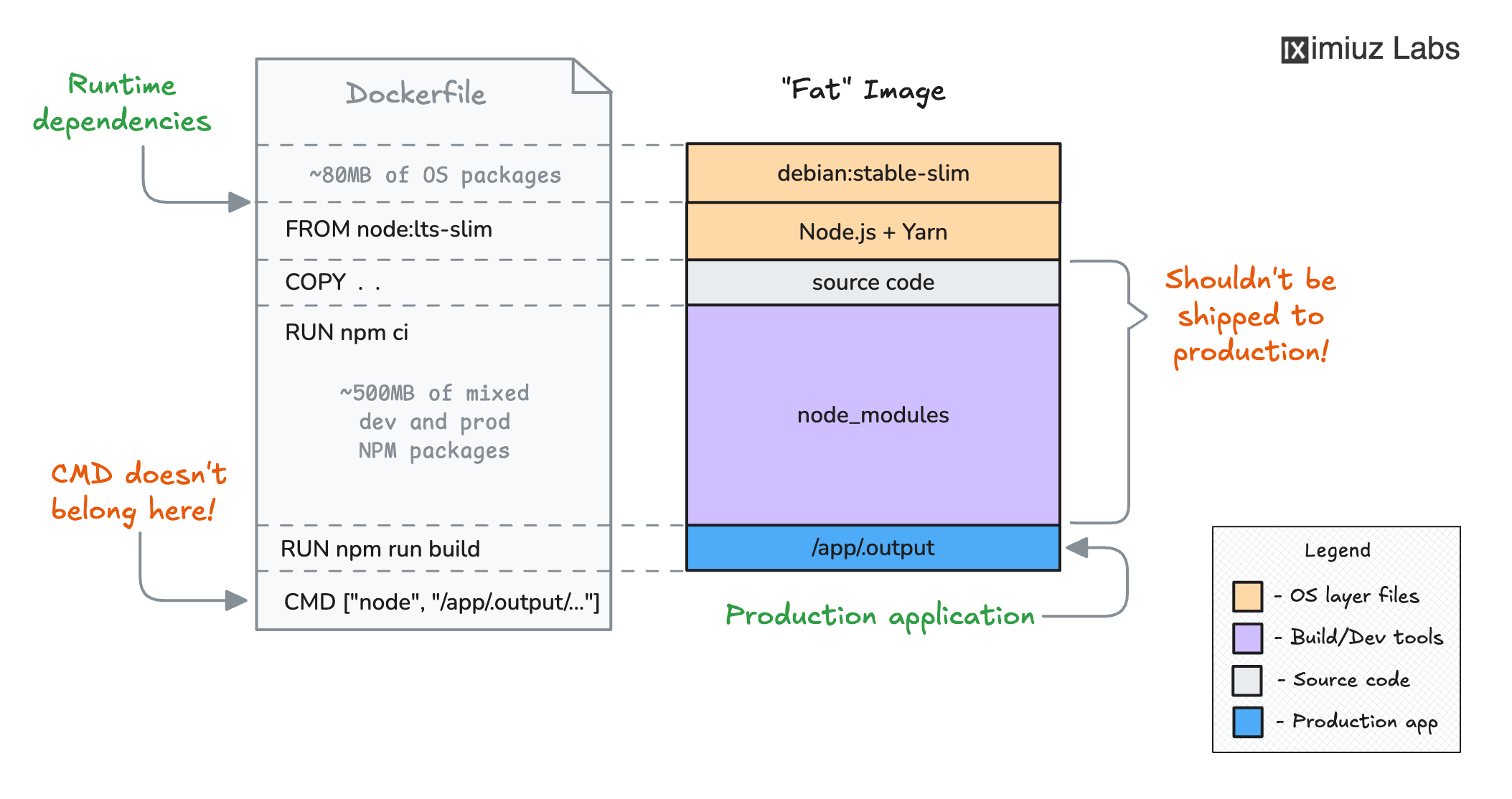
Similarly, when you build a TypeScript frontend in a single stage, the TypeScript compiler, type definitions, and all other dev dependencies remain in the final image even though they’re only needed during compilation:
The solution: Multi-Stage Builds#
Multi-stage builds solve this by allowing multiple FROM instructions in a single Dockerfile - one for building the application and another for running it. The COPY --from=<build-stage> instruction lets you cherry-pick only the build artifacts you need into the final runtime image:
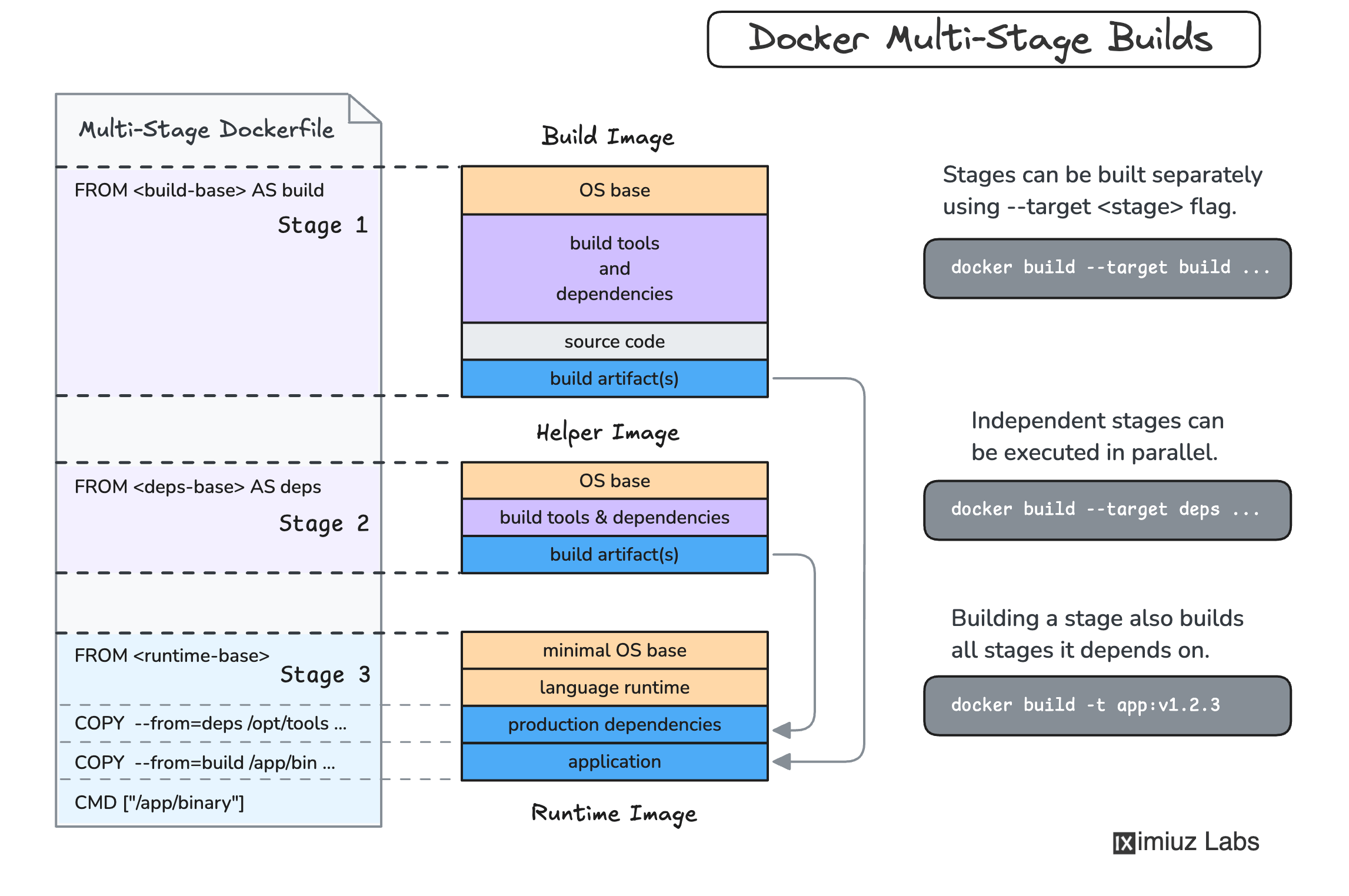
The key to this challenge is separating the build and runtime environments into different stages within a single Dockerfile. Each stage starts with its own FROM instruction, and you use COPY --from=<stage> to transfer only the necessary artifacts from the build stage to the runtime stage.
1. Go backend: Multi-Stage Dockerfile#
Create ~/backend/Dockerfile:
# Build stage - uses the Go compiler
FROM golang:1.26 AS build

WORKDIR /app

COPY . .
RUN CGO_ENABLED=0 go build -o server .

# Runtime stage - minimal base, no Go compiler
FROM alpine:3

COPY --from=build /app/server /app/server

CMD ["/app/server"]
Key points:
- The build stage (
FROM golang:1.26 AS build) includes the Go compiler needed forgo build. CGO_ENABLED=0produces a statically linked binary that doesn’t depend on C libraries.- The runtime stage (
FROM alpine:3) is a minimal ~7MB image. COPY --from=buildcopies only the compiled binary - the Go compiler and all its toolchain stay behind in the build stage.- The result is an image that’s roughly 15-20MB instead of 800MB+.
Build the image:
docker build -t my-backend:v1.0.0 ~/backend/2. TypeScript frontend: Multi-Stage Dockerfile#
Create ~/frontend/Dockerfile:
# Build stage - install all deps and compile TypeScript
FROM node:24-slim AS build

WORKDIR /app

COPY . .
RUN npm ci
RUN npm run build

# Runtime stage - only production deps
FROM node:24-slim

WORKDIR /app

COPY package*.json ./
RUN npm ci --omit=dev

COPY --from=build /app/dist ./dist

CMD ["node", "/app/dist/server.js"]
Key points:
- The build stage installs ALL dependencies (including
typescriptas a dev dependency) and runsnpm run buildto compile TypeScript to JavaScript. - The runtime stage starts fresh from
node:24-slimand installs only production dependencies withnpm ci --omit=dev. COPY --from=build /app/dist ./distcopies only the compiled JavaScript files.- The TypeScript compiler and all other dev dependencies are left behind in the build stage.
Build the image:
docker build -t my-frontend:v1.0.0 ~/frontend/