Publishing to Docker Hub#
Let’s publish the Go server we Dockerized up to Docker Hub.
- Rebuild the Go binary:
GOOS=linux GOARCH=amd64 go build- Rebuild the image. You’ll need to use a name that corresponds to your namespace on Docker Hub. Swap out
USERNAMEfor your Docker Hub username.
docker build . -t USERNAME/goserver- Run your image in a container to make sure it still works:
docker run -p 8991:8991 USERNAME/goserver- Push the image to Docker Hub:
docker push USERNAME/goserverDelete and Pull#
Let’s delete our local copy of the image, then pull it back down from Docker Hub. Just like with GitHub, the nice thing about having images in the cloud is that if something happens to your computer, or you’re working on another machine, you can always pull down your images.
- Remove your local
USERNAME/goserverimage:
docker image rm USERNAME/goserver- Pull it back down from Docker Hub:
docker pull USERNAME/goserver- Run it to make sure it works:
docker run -p 8991:8991 USERNAME/goserverTags#
Let’s publish a new version of our web server. With Docker, a tag is a label that you can assign to a specific version of an image, similar to a tag in Git.
The latest tag is the default tag that Docker uses when you don’t specify one. It’s a convention to use latest for the most recent version of an image, but it’s also common to include other tags, often semantic versioning tags like 0.1.0, 0.2.0, etc.
Deployment Pipelines#
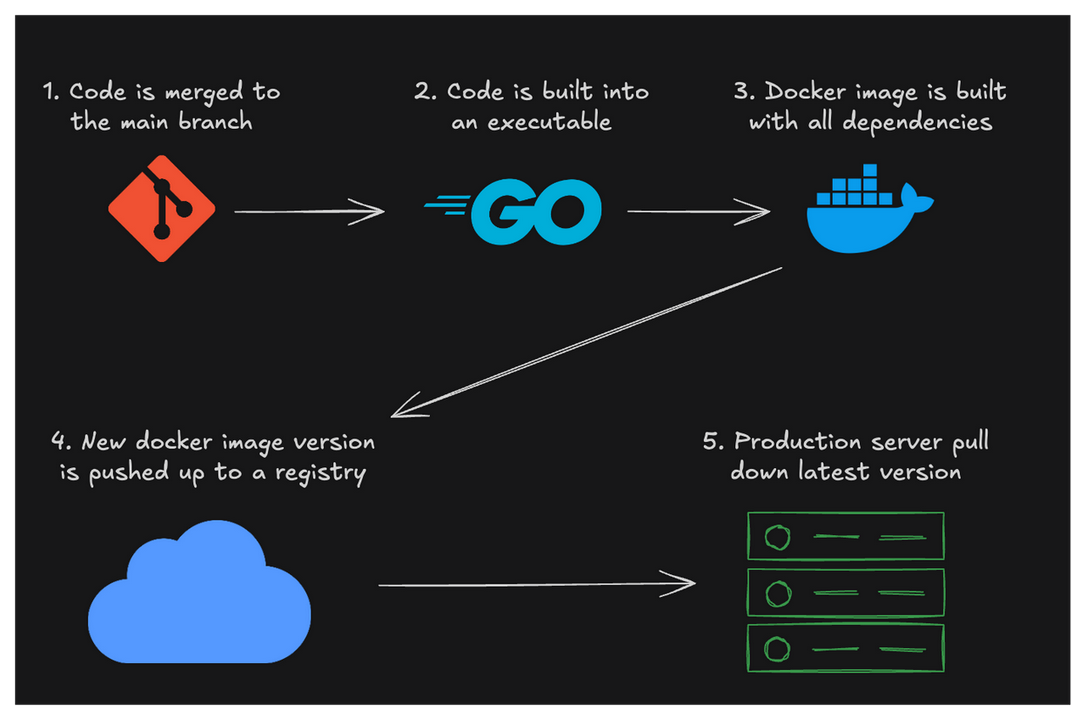
Publishing new versions of Docker images is a very common method of deploying cloud-native back-end servers. Here’s a diagram describing the deployment pipeline of many production systems (including the server that powers the Boot.dev site you’re on currently).
Latest#
If you look closely, you’ll notice that your old version is tagged “latest”… that’s a bit confusing. As it turns out, the latest tag doesn’t always indicate that a specific tag is the latest version of an image. In reality, latest is just the default tag that’s used if you don’t explicitly supply one. We didn’t use a tag on our first version, that’s why it was tagged with “latest”.
Should I Use “latest”?#
The convention I’m familiar with is to use semantic versioning on all your images, but to also push to the “latest” tag on your most recent image. That way you can keep all of your old versions around, but the latest tag still always points to the latest version.
So, for example, if I were updating an application to version 5.4.6, I would probably do it like this:
docker build -t ulutasalperen/awesomeimage:5.4.6 -t ulutasalperen/awesomeimage:latest .
docker push ulutasalperen/awesomeimage --all-tags
The Bigger Picture#
This is the last lesson, but before we go, I want to reiterate how Docker fits into the software development lifecycle, particularly at modern “DevOpsy” tech companies, because it’s really important to understand.
The Deployment Process#
- The developer (you) writes some new code
- The developer commits the code to Git
- The developer pushes a new branch to GitHub
- The developer opens a pull request to the
mainbranch - A teammate reviews the PR and approves it (if it looks good)
- The developer merges the pull request
- Upon merging, an automated script, perhaps a GitHub action, is started
- The script builds the code (if it’s a compiled language)
- The script builds a new docker image with the latest program
- The script pushes the new image to Docker Hub
- The server that runs the containers, perhaps a Kubernetes cluster, is told there is a new version
- The k8s cluster pulls down the latest image
- The k8s cluster shuts down old containers as it spins up new containers of the latest image
It’s Never the Same#
While the deployment process I’ve outlined above is a common one, especially at newer “cloud native” companies, two companies rarely have identical processes. Instead of GitHub, it might be GitLab. Instead of Docker Hub, it might be ECR. Instead of Kubernetes, it might be Docker Swarm or a more managed service.
That said, I hope this helps give you an idea of what to expect in the wild.