Regions and Availability Zones#
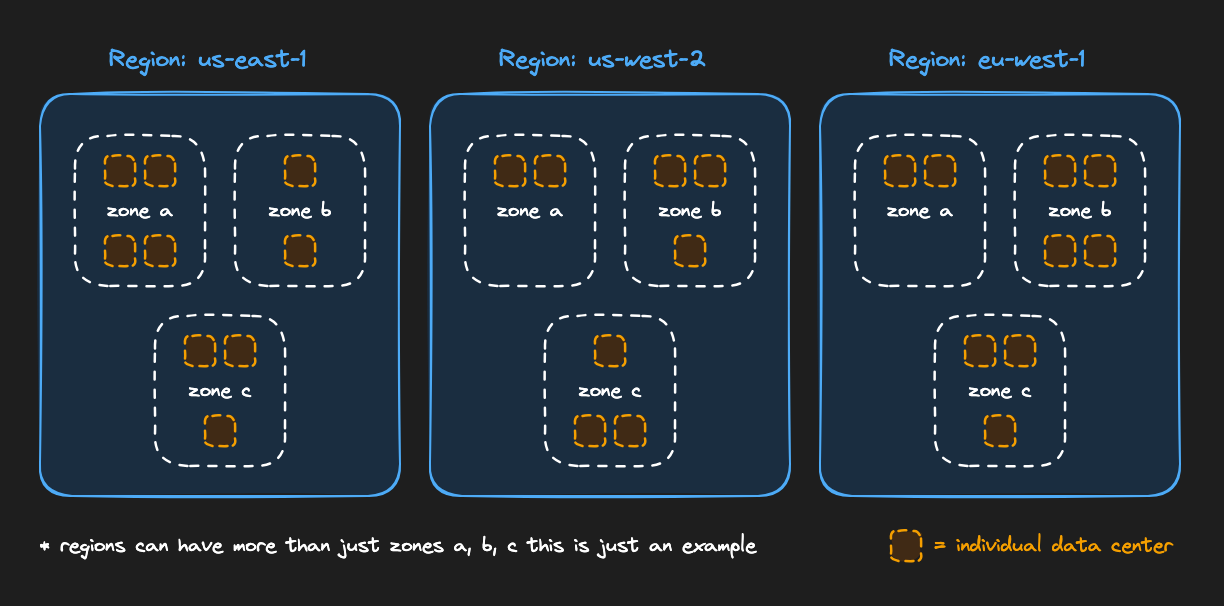
AWS has many regions to choose from. Each region is where your services are geographically located.
- An outage in one region will (usually) not affect another region.
- The farther a server is from the user, the higher the latency. Choose a region close to the folks using your service.
- Some services are available only in certain places, or are significantly more expensive in some regions. So we need to make sure a region meets our needs.
- As a service grows, we may want to host in more than one region. We also pay a toll for transferring data between regions.
Availability Zones (AZs)#
Each region is split into “zones,” which means separate infrastructure within the same region.
- An outage in one zone will (usually) not affect servers hosted in another zone.
- We pay a toll for transferring data between zones.
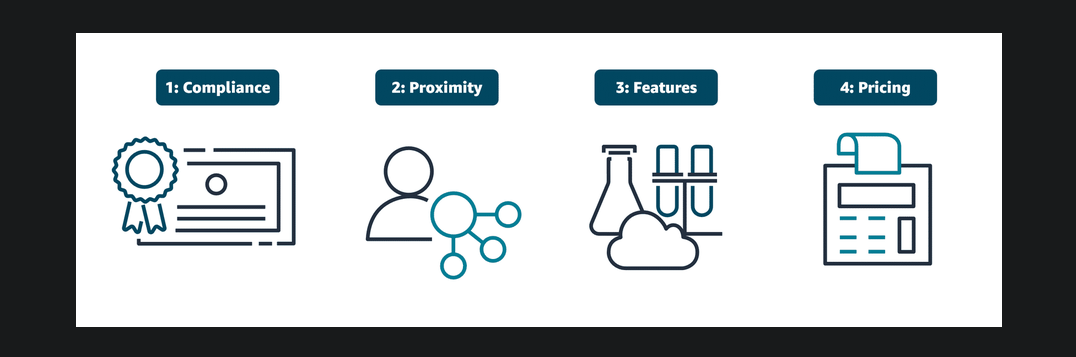
Key considerations when choosing Regions#
Compliance#
Compliance is an important consideration when selecting Regions for deploying business resources. Different geographical locations have varying regulatory requirements and data protection laws that organizations must follow. For example, the General Data Protection Regulation (GDPR) is designed to protect the personal data and privacy of individuals within the European Union (EU). An online retail company operating in the EU would be required to meet GDPR compliance to protect customer data. GDPR compliance includes obtaining proper consent for data collection and providing mechanisms for data access and deletion. Numbered divider2
Proximity#
When selecting a Region, you also want to consider how to achieve low latency for your users. Regions closer to your user base minimize data travel time, which reduces latency and enhances application responsiveness. Choosing a Region or set of Regions farther away from customers could introduce delays, which might impact user satisfaction and overall system efficiency. Numbered divider3
Feature availability#
You also want to consider which specific features and services are available in each Region. AWS is constantly expanding features and services to multiple locations, but not all Regions contain all AWS offerings. For example, AWS GovCloud Regions are specifically designed to meet the compliance and security requirements of US government agencies and their contractors. These Regions have stringent physical, operational, and personnel security controls in place. These controls are only available in specific Regions to meet certain governmental regulatory requirements. Numbered divider4
Pricing#
When selecting a Region, pricing is also a factor that can influence your decision. Some Regions have lower operational costs than others. These operational costs can impact the overall expenses for hosting applications and services. Tax laws and regulations can also play a role in cost. Some Regions might offer tax incentives or have lower tax rates, which can affect customer pricing. Additionally, data sovereignty laws in certain Regions might require data to be stored locally, affecting both compliance and cost.
Designing highly available architectures#
Deploying multi-Region and multi-AZ resources
You’ve learned how deploying your cloud resources to multiple Regions can achieve high availability. In addition to deploying to multiple Regions, you also want to deploy resources to multiple Availability Zones. By building redundant architectures or replicating your resources across multiple levels of AWS infrastructure, you can improve application reliability so that your users have access to your content when they need it.
In addition to high availability, the AWS Global Infrastructure also helps you achieve agility and elasticity for your business. Let’s discuss the difference between these advantages:
High availability: High availability refers to the capability of a system to operate continuously without failing. In the context of AWS infrastructure, it means that your applications can handle the failure of individual components without significant downtime.
Agility: Agility refers to the ability to quickly adapt to changing requirements or market conditions. With AWS infrastructure in place, you can modify and deploy services rapidly.
Elasticity: Elasticity refers to the ability of a system to scale resources up or down automatically in response to changes in demand. AWS infrastructure is set up for you to scale resources up and down on demand.
Edge locations#
In addition to AWS Regions that contain Availability Zones, AWS has a global edge network that provides quicker content access to users outside of standard Regions. These edge locations are strategically placed in areas like Atlanta, Georgia, USA or Shanghai, China to provide low-latency access to AWS services and content delivery. Edge locations offer multiple services to run closer to end users, including AWS networking services like Amazon CloudFront. CloudFront is a content delivery network (CDN) and caching system that you learn more about later in this training.
Assignment#
Set your default AWS region to us-east-1.
Cost check: Listing regions and availability zones is free, and changing your default region is also free.
- List all available AWS regions using the AWS CLI:
aws ec2 describe-regions --output tablePress “q” to quit when you’re done looking at the output.
- List availability zones for your current region:
aws ec2 describe-availability-zones --output table- Switch your default region to
us-east-1(if it isn’t already):
aws configure set region us-east-1In the AWS web console, open the region dropdown and select “N. Virginia” (
us-east-1) to match your CLI region.Verify your region is set correctly:
aws configure get regionYou should now see
us-east-1as the output.