Identity and Access Management (IAM)#
At some stage in building a project on AWS, you’ll need to give other people (or perhaps automated systems) access to your cloud resources as well. IAM is how AWS controls access to resources: who can log in, and what they can do once they’re in.
- Who are you? (Identity)
- What are you allowed to do? (Access)
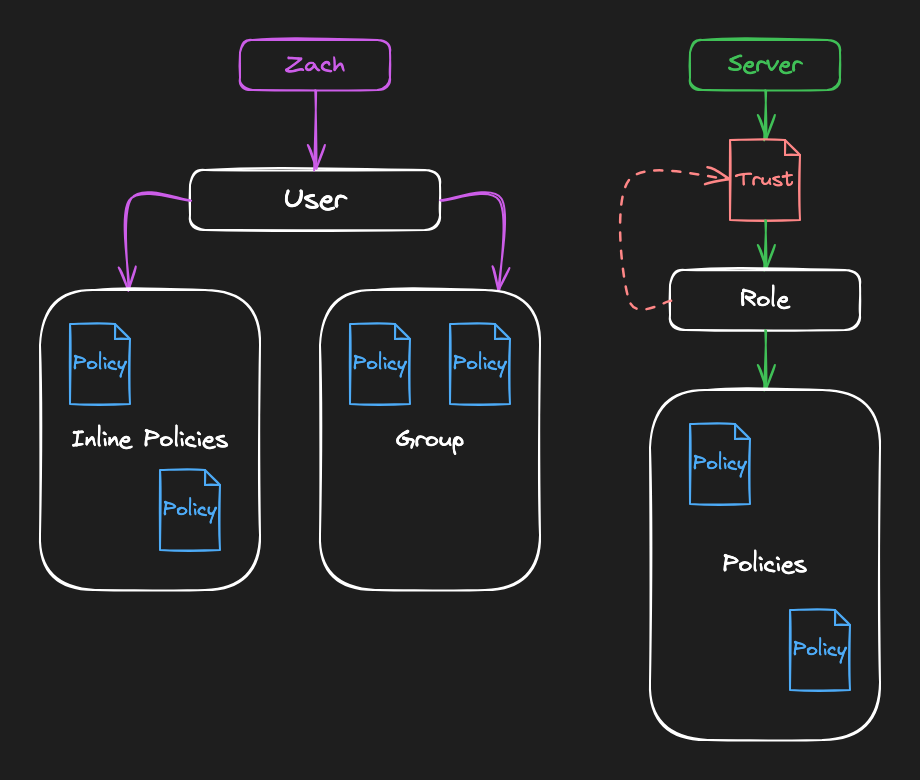
IAM uses a few core pieces:
- Users: The baseline identity: comes with keys and/or passwords (e.g.
zach-admin). - Groups: Groups of users that share permissions. A user can be part of multiple groups (e.g.
BillingorDevelopers). - Policies: Rules that define what actions are allowed or denied on resources (e.g.
Can access EC2). These are usually written in JSON.
Policies attached directly to a user are called inline policies, and are generally considered bad practice.
Users, groups, and policies work well for humans, but what about applications and infrastructure that need access? That’s what roles and trust policies are for:
- Roles: Temporary, assumable identities with permissions. Best for applications and services. No long-lived credentials.
- Trust Policies: Define how an application or service can assume a role.
| Task | Answer |
|---|---|
| Frank, a solo dev, needs to login to the AWS console | User |
| The accounting team needs billing access | Group |
| Zach needs access to EC2 | Policy |
| The application’s backend server needs access to S3 | Roles |
| All the application servers need access to RDS | Trust Policies |
Cost check: IAM users, groups, roles, and policies are free. Costs come from the resources those identities use (EC2, S3 etc.), not from IAM itself.