Amazon EC2 instance store#
Amazon EC2 instance store isn’t a stand-alone AWS block storage service. Rather, it refers to the block-level storage that is physically attached to the EC2 instance host computer. Depending on the type of instance, EC2 instance store might come attached as the default storage. Since its data is lost when an instance is stopped or terminated, EC2 instance store is best for temporary memory-based storage needs like buffers, caches, and scratch data. It is not recommended for applications that require data retention.
Key takeaway: no data persistence#
An Amazon EC2 instance store provides temporary block-level storage for an Amazon EC2 instance. This means that if you stop or terminate an Amazon EC2 instance, all the data written to the attached instance store is deleted.
To learn how Amazon EC2 instance store manages data when an EC2 instance is stopped, choose each of the following three numbered markers.
Amazon Elastic Block Store (EBS)#
Amazon EBS provides persistent block-level storage volumes for use with Amazon EC2 instances. EBS volumes act like external hard drives, offering consistent and low-latency performance for workloads like databases and file systems.
EBS volumes can be conveniently backed up, resized, and attached to different EC2 instances. To create an EBS volume, you define the configuration for things like volume size and type. After the volume has been created, it can be attached to an Amazon EC2 instance. Because EBS volumes are for data that needs to persist, it’s important to back up the data. It’s recommended that you take incremental backups of EBS volumes by creating Amazon EBS snapshots.
Key takeaway: data persistence#
Amazon EBS provides block-level storage volumes that you can use with Amazon EC2 instances. If you stop or terminate an Amazon EC2 instance, all the data on the attached EBS volume remains available.
To learn how Amazon EBS manages data when an EC2 instance is stopped, choose each of the following three numbered markers.
Use cases#
Some practical use cases of Amazon EBS include database hosting, backup storage for applications, and rapid deployment of development environments using volume snapshots.
Benefits#
EBS volumes support data portability through their ability to detach and reattach to instances as needed. There are many practical reasons you might choose to do this.
EBS Snapshots#
EBS snapshots are point-in-time backups of EBS volume. They can be used for disaster recovery, data migration, volume resizing, and for creating consistent backups of production workloads. EBS snapshots are incremental, so they only save the blocks on the volume that have changed after your most recent snapshot.
EBS snapshots can be used to create multiple new volumes, and new volumes created from a snapshot are an exact copy of the original volume at the time the snapshot was taken. Snapshots of EBS volumes are stored redundantly in multiple Availability Zones using Amazon S3.
Working with EBS snapshots#
In keeping with the AWS shared responsibility model, as the customer, you are responsible for scheduling and managing regular EBS snapshots as part of your backup strategy. This includes monitoring snapshot costs and deleting unnecessary snapshots to avoid excessive charges. You also need to make sure sensitive data within snapshots is encrypted, verify snapshot integrity, and test restoration procedures regularly.
Amazon Elastic File System (EFS)#
Amazon EFS is a fully managed, scalable file storage service for use with AWS cloud services and on-premises resources. It operates using the Linux Network File System (NFS) protocol, and automatically scales to petabytes as you add or remove files without disrupting applications. EFS is designed to support a wide variety of workloads and can be accessed by multiple EC2 instances simultaneously.
Amazon EFS benefits#
Multi-AZ redundancy
Amazon EFS automatically replicates data across multiple Availability Zones in a region for high availability. This built-in redundancy protects against AZ failures and provides continuous access to your file systems.
Shared access
Amazon EFS supports thousands of concurrent NFS connections, so multiple EC2 instances can access the same file system simultaneously. This shared access model makes EFS ideal for collaborative workloads and distributed applications.
Elastic storage
Amazon EFS automatically grows and shrinks as you add and remove files, with no need to provision or manage storage capacity. And since you only pay for the storage you use, it’s cost-effective for varying workload demands.
Amazon EFS storage classes#
With Amazon EFS, you can create and configure file systems quickly without any minimum fee or setup cost. You pay only for the storage used and you can choose from a range of storage classes designed to fit your use case.
Standard storage classes
The EFS Standard and EFS Standard-Infrequent Access (Standard-IA) storage classes offer Multi-AZ resilience and the highest levels of durability and availability. They have a higher cost associated with them due to higher availability and durability.
One zone storage classes
The EFS One Zone and EFS One Zone-Infrequent Access (EFS One Zone-IA) provide additional savings by saving your data in a single Availability Zone. By using just one Availability Zone, you can reduce your storage costs when compared to the Standard EFS storage classes.
Archive storage classes
The EFS Archive storage class is cost-optimized for data that is accessed only a few times a year or less and that does not need the sub-millisecond latencies of EFS Standard. EFS Archive offers a storage price up to 50% lower compared to EFS Infrequent Access, providing a more cost-optimized experience for cold, rarely-accessed data.
Amazon EFS data lifecycle#
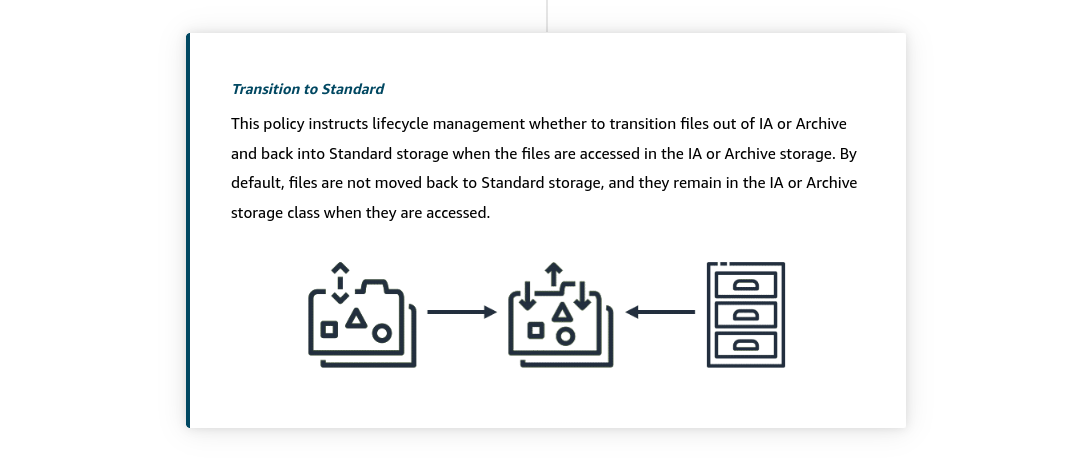
You can further optimize Amazon EFS storage costs by automatically moving data between storage classes based on usage patterns. You can create lifecycle policies that determine when and how files transition between different storage tiers. These automated policies help ensure your data resides in the most cost-effective storage class without manual intervention.
AWS Storage Gateway#
Storage Gateway is a hybrid cloud storage service that makes it possible to seamlessly integrate on-premises environments with AWS Cloud storage. You can use it to extend your local storage to the cloud while maintaining low-latency access to frequently used data.
You can use Storage Gateway to streamline storage management and reduce costs for practical hybrid cloud storage use cases. These include moving backups to the cloud, using on-premises file shares backed by cloud storage, and providing low-latency access to data in AWS for on-premises applications.
Gateway types#
Storage Gateway offers three distinct types of gateways to meet different hybrid storage needs. Each gateway type is designed to address specific use cases and workload requirements.